
 By Robert Smith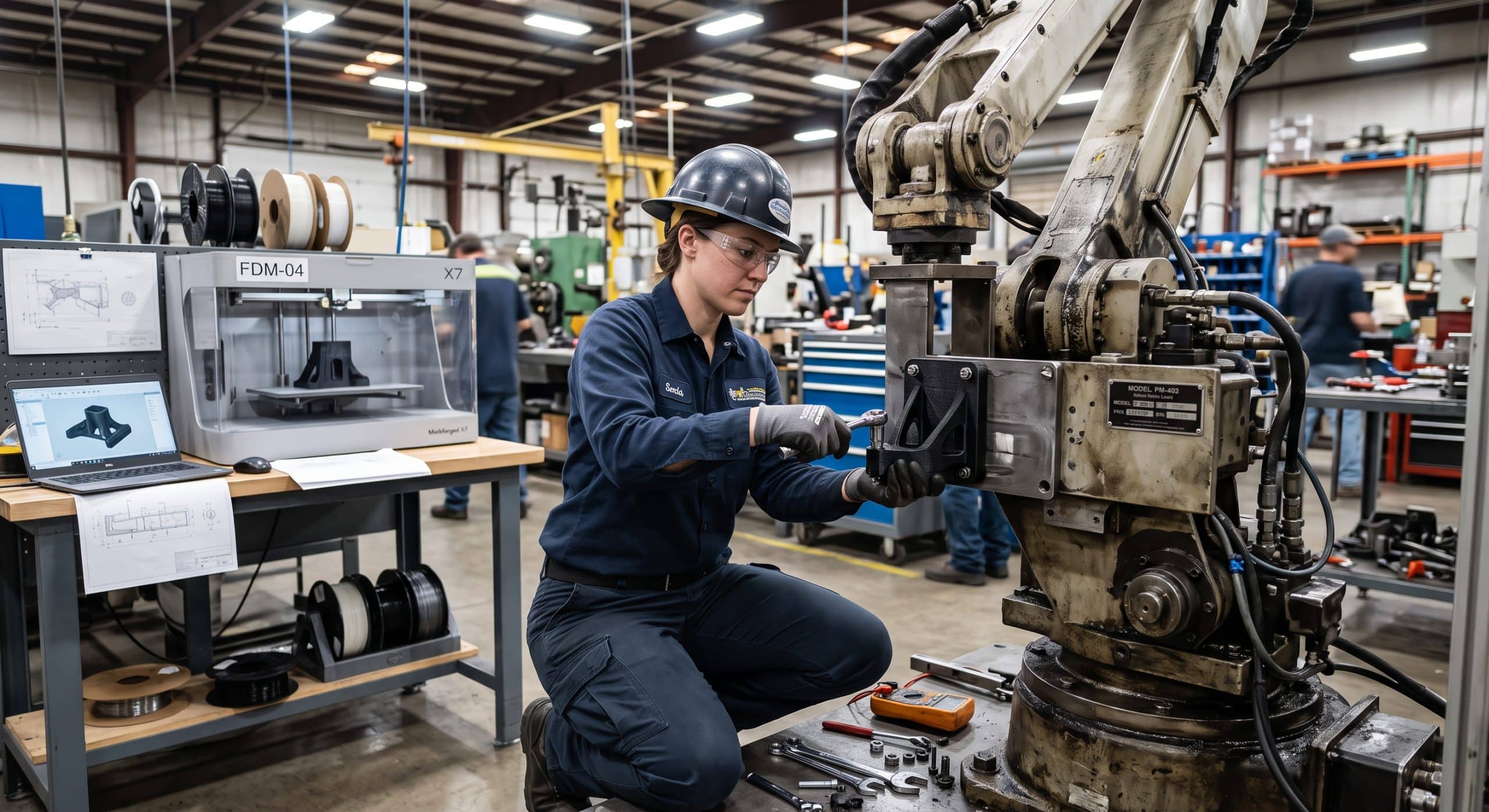
I get one phone call more often than any other. On the other end is a maintenance manager, a line that isn’t moving, and an eleven-dollar component in his hand—the exact situation where 3D printed replacement parts make all the difference. Sometimes it’s a cracked guide on a conveyor. Other times it’s a gear from a filler that was installed before half his crew was born. In most cases, the OEM has either stopped making it, wants a minimum order of fifty, or quotes an eight-week lead time while the line burns money every hour it sits there.
That call is the reason I got into additive manufacturing as a career, and it’s also the reason I’m writing this. I’ve spent years as an additive manufacturing engineer helping plants, fleets, and service companies figure out where 3D printed replacement parts make sense and, just as important, where they don’t. So let me walk you through it the way I would if we were standing next to your broken machine together.
The Real Cost of Waiting on a Part
Let’s start with the number that should keep every plant manager up at night. Siemens publishes a report called The True Cost of Downtime, and the 2024 edition estimated that the world’s 500 largest companies lose roughly $1.4 trillion a year to unplanned downtime. Put another way, that’s about 11% of their revenue. In automotive, for example, an idle line can cost up to $2.3 million an hour. Heavy industry, meanwhile, sees figures that are even more painful.
Of course, most of the people I work with aren’t running Fortune Global 500 operations. Instead, they’re running a regional plant, a packaging facility, a food processing line, or a fleet of service vehicles. Still, the math scales down in a very uncomfortable way. If your line generates a few thousand dollars of output an hour, then three weeks of waiting on a bracket turns into a number nobody wants to explain to the owner.
The waiting costs more than the failure
Here’s what I’ve learned after a lot of these conversations. The failure itself is rarely the expensive part, because the waiting is. A broken part that you can replace in two hours is a nuisance. On the other hand, a broken part that you can’t get for six weeks is a crisis. That gap between “it broke” and “it’s fixed” is exactly where 3D printed replacement parts do their best work.
Why the Spare Parts Problem Keeps Getting Worse
When I started in this field, most people thought of spare parts as a purchasing problem. Order the right stuff, keep it on the shelf, and you’re done. However, that model is breaking down for a few reasons, and understanding them will help you see where printing fits.
Equipment lives longer than its support
Plants run machines for twenty, thirty, sometimes forty years. Meanwhile, the companies that built them get acquired, change product lines, or simply stop supporting older models. Deutsche Bahn talks openly about this. Their trains stay in service for decades, so manufacturers discontinue older components long before the trains retire. That’s exactly the situation where they turned to 3D printed replacement parts.
Minimum order quantities don’t match maintenance reality
Tooling for an injection molded part or a casting costs real money, so suppliers want volume. You need one, but they want you to buy a hundred. As a result, you now have ninety nine parts sitting on a shelf for a decade, tying up cash and floor space.
Warehouses still never have what you need
Every maintenance storeroom I’ve ever walked into has two things in common. First, it’s full of parts nobody has touched in years. Second, it’s missing the one part that just failed. On top of that, carrying slow moving spares costs money in space, handling, insurance, and write offs.
Supply chains got fragile
The last several years taught everyone that a part sitting on a ship or stuck at a supplier is worth nothing to you. In fact, lead times that used to be two weeks stretched into months for a lot of components.
Put those together and you get a clear picture. The traditional approach of “buy it in bulk and store it forever” is slow and expensive, and it still leaves gaps. 3D printed replacement parts don’t replace that system entirely. Even so, it fills those gaps better than anything else I’ve seen.
What 3D Printed Replacement Parts Actually Are (and What They Aren’t)
I want to clear something up right away, because a lot of people come to me with the wrong picture in their head. When I say 3D printed replacement parts, I don’t mean a desktop hobby printer squeezing out a flimsy plastic trinket. Instead, I mean engineered parts, made from industrial materials, on machines built to hold tolerances and produce repeatable results.
There are a handful of processes I use regularly, and each one has its place.
Material extrusion (FDM or FFF)
This is the one most people have seen. A heated nozzle lays down plastic layer by layer. On an industrial machine, though, with materials like carbon fiber filled nylon or ULTEM 9085, it’s excellent for brackets, guards, jigs, fixtures, and tooling. It’s also usually the cheapest and fastest way to get a functional part in someone’s hand.
Powder bed fusion for polymers (SLS and Multi Jet Fusion)
Here, a laser or fusing agent melts nylon powder one layer at a time. Because the unmelted powder supports the part, you can make complex shapes without support structures. As a result, PA12 and PA11 parts from these processes are tough and consistent, and they’re good for gears, clips, housings, ducts, and anything with snap fits or living hinges.
Vat photopolymerization (SLA)
With SLA, liquid resin is cured with light. The result is a great surface finish and fine detail. I use it for seal molds, small precision components, and fit checks. Besides that, there are engineering resins now that handle heat and impact reasonably well.
Metal powder bed fusion
This is where people’s eyebrows go up. Stainless steel, tool steel, aluminum, titanium, and nickel alloys can all be printed fully dense from a digital file. Admittedly, it’s more expensive and needs more post processing. Still, for the right part it can replace a casting or a machined component that’s no longer available.
Directed energy deposition and hybrid systems
These systems deposit metal and often combine that with machining in the same setup. For that reason, they’re great for large parts and for repairs, where you build material back onto a worn component instead of replacing it entirely.
Where printing is the wrong answer
That said, 3D printed replacement parts are not a magic answer for everything. A printed nylon part, for instance, is not going to stand in for a hardened steel shaft carrying heavy torque. Similarly, a pressure vessel component is going to need a level of qualification that most plants don’t have the appetite for. Part of my job, and honestly the most valuable part, is telling people no when printing isn’t the right call.
Proof That It Works: What the Big Operators Are Doing
I’m not asking you to take this on faith. After all, some of the most demanding maintenance operations in the world have been doing this for years, and their results are public.
Deutsche Bahn
Deutsche Bahn started making 3D printed replacement parts in 2015. By late 2025, they had produced more than 200,000 printed parts with over 1,000 active applications, ranging from small items to 540 kilogram gearbox housings for shunting locomotives. They also keep a digital warehouse of more than 1,000 component designs. What I like about their story is how practical it is. They’re not printing for the headlines. Rather, they’re printing because it keeps aging trains running and removes the cost of stocking slow moving spares.
Siemens Mobility
Siemens Mobility built a digital rail maintenance center in Dortmund that services around 100 trains a month. Using a Stratasys Fortus 450mc with ULTEM 9085, they cut manufacturing time for certain spare parts by about 95%. Specifically, parts that took six weeks through traditional casting could be printed in 13 hours. Now think about that in terms of your own line. Six weeks versus half a day.
BMW Group
BMW Group printed more than 300,000 parts at its Additive Manufacturing Campus in 2023, and it produces around 100,000 more each year across its plants. A lot of that is tooling and grippers. Because their printed grippers are lighter, they put less stress on the robots carrying them, which extends component life and cuts unplanned stoppages. That’s a maintenance benefit people often overlook. In short, printing doesn’t only replace broken parts. It can also help keep other parts from breaking.
The U.S. Navy
The U.S. Navy installed a hybrid metal printing system on the USS Bataan in 2022. Then, in 2023, a stainless steel sprayer plate on the ship’s de ballasting air compressor broke, and there was no replacement in the stock system. Consequently, the crew printed and installed a new one at sea in under five days. As the chief engineer put it, they printed a part that wasn’t available “in less time than normal supply chains could have delivered it.”
If a ship in the middle of the ocean can do it, then a plant with a decent service partner certainly can.
Which Parts Should You Print First?
This is where most programs either succeed or quietly die. Too often, people get excited, try to print the hardest, most critical part in the building, and it doesn’t go well. After that, the whole idea gets shelved. So don’t do that. Instead, start where the odds are in your favor.
A simple triage checklist
When I sit down with a maintenance team to plan their first 3D printed replacement parts, I look for candidates that check most of these boxes:
- Long lead time or obsolete. If you can get it tomorrow from a distributor for a reasonable price, then printing probably isn’t worth it.
- Low volume. You need one, two, or ten, rather than ten thousand.
- Non structural or moderately loaded. Guards, covers, guides, spacers, brackets, knobs, handles, ducting, cable management, sensor mounts, change parts, and wear strips are all great candidates.
- Plastic or simple metal geometry. Polymer parts are the easiest win. In fact, many original plastic parts can be matched or even improved with a better printing material.
- Clear failure history. If it breaks often, you already know the load case, so you can design something tougher.
- Manageable consequences. If the printed part fails, does it just stop the machine, or does it hurt someone? Obviously, start with the first category.
I’d also put jigs, fixtures, and maintenance tools on your early list. Although they’re not replacement parts in the strict sense, they speed up every repair your team does, and they build confidence in the technology.
Parts to leave for later
On the other hand, the parts I tell people to leave alone at first are anything safety critical, anything in a pressure boundary, lifting components, high speed rotating parts, and anything under regulatory control unless you have a proper qualification path. Those can be done in some cases. However, they belong in phase two or three, not phase one.
How I Take a Part From Broken to Back in Service
People often ask me what the process looks like on a real job. It’s less mysterious than you might think, and here’s roughly how I run it.
Step one: capture the geometry
If there’s a drawing or CAD model, great. Most of the time, though, there isn’t. So I measure the broken part with calipers and gauges, and for anything with complex curves I use a 3D scanner. I always check the mating parts too, because a worn original part can mislead you. For that reason, I’d rather measure the hole it goes into than trust the part that already failed.
Step two: understand why it failed
This is the step people skip, even though it’s the most important one. Did it crack from fatigue? Did it melt from heat, wear from abrasion, or break from impact? If I just copy the original, then I’m copying its weakness too. When I know why it failed, however, I can pick a better material, add material in the stress zone, round off a sharp corner, or change the orientation so the layers carry the load properly.
Step three: design for additive
A part designed for molding or machining isn’t automatically a good printed part. Therefore, I’ll adjust wall thicknesses, add fillets, design in clearance for fits, and sometimes consolidate two or three components into one. Since printed parts behave differently in different directions, I think about how layers will line up against the loads before I ever hit print.
Step four: choose the material and process
Heat, chemicals, UV, moisture, food contact, flame rating, and wear all drive the choice. For example, a guard near a hot zone might need ULTEM or PEEK. Likewise, a food zone part needs a material and process that fits your sanitation and compliance requirements. Meanwhile, a worn gear might do beautifully in PA12, or it might need metal.
Step five: print, post process, and inspect
Depending on the process, that can mean support removal, heat treatment, machining critical surfaces, reaming holes to size, or adding threaded inserts. After that, I check dimensions against the drawing or the mating parts.
Step six: fit, test, and document
Next, I want the part installed and run under observation, ideally with a plan for when to check it again. Finally, every successful part gets documented: the file, the material, the print settings, the post processing, and the inspection results. That documentation is what turns a clever one off into a repeatable part you can reorder in an afternoon.
For a straightforward polymer part, this whole cycle can happen in one to three days. For metal, it may take a week or so, which is still a big improvement over the six or eight weeks many people are quoted.
The Digital Warehouse: The Real Long Term Payoff
Here’s the idea that changes how maintenance leaders think about all this. Once a part is designed, tested, and documented, you don’t need to keep it on a shelf anymore. Instead, you keep the file.
That’s what people mean by a digital warehouse or digital inventory. Deutsche Bahn, for instance, has more than 1,000 designs in theirs. Rather than storing physical stock for every slow moving spare, they store validated files and print when needed.
In practical terms, this means lower inventory costs, less floor space, fewer obsolete parts written off, and faster response when something fails. It also protects you from the day a supplier discontinues a part. After all, once you have a validated file, that part can’t become obsolete on you.
I always tell clients to build this one part at a time. Every time one of your 3D printed replacement parts proves itself in service, add it to the library. Eventually, after a year or two, you’ll be surprised how much of your storeroom can live on a server instead.
The Questions You Should Be Asking (IP, Safety, and Quality)
I’d be doing you a disservice if I only talked about the upside. There are real questions you need to answer, and a good additive partner should raise them before you do.
Intellectual property
Just because you can reverse engineer a part doesn’t automatically mean you have the right to reproduce it in every situation. Patents, design rights, and your service contracts all matter. In many cases, printing a part for your own maintenance use on your own equipment is common practice, especially when it’s obsolete. Even so, you should check with your legal team and, when possible, talk to the OEM. More and more OEMs are also offering licensed digital files or their own print on demand services, which is a great option when it’s available. Keep in mind I’m an engineer, not a lawyer, so treat this as a flag to look into rather than legal advice.
Warranty and liability
Installing a non OEM part may affect warranty coverage on equipment that’s still under contract. For that reason, know where you stand before you swap.
Safety and compliance
If the part touches food, pharmaceuticals, pressure, lifting, electrical insulation, or anything regulated, then you need the right materials, documentation, and sometimes certification. In addition, there’s a whole framework of standards for additive manufacturing, including ISO/ASTM 52900 for terminology and related standards for qualification and testing. You don’t need to memorize them. However, whoever prints your parts should know them.
Quality and repeatability
A part that works once isn’t the goal. Rather, the goal is a part that works every time you print it. That is why process control and documentation matter so much: same material handling, same settings, same post processing, same inspection. Ultimately, that’s what separates professional 3D printed replacement parts from something someone made in their garage.
Making the Business Case
When a maintenance manager has to justify a printing program to leadership, I suggest keeping the math simple and honest.
Start with your own failure history
First, pick a handful of real parts that have stopped your lines. For each one, write down the downtime hours it caused, your cost per hour of downtime, the OEM lead time and price, and what it costs you to stock it. Then compare that with the printed alternative: design time, print cost, post processing, and turnaround.
Printing wins on time, not unit price
What you’ll usually find is that per part cost isn’t where 3D printed replacement parts win. In fact, sometimes a printed part costs more than the original catalog price. Printing wins on time. So if a part costs $300 to print instead of $80 from the OEM, but it gets your line running three weeks earlier, that comparison isn’t close.
Besides that, the secondary savings add up too. You get less inventory, fewer rush freight charges, fewer expedite fees, less obsolete stock written off, and better parts that fail less often. Above all, and this is the one I care about most as an engineer, your team gets the ability to solve problems themselves rather than waiting on someone else.
In House Printer or Service Partner?
This comes up in almost every conversation. My honest answer is that it depends on your volume, your team, and the kinds of parts you need.
The hybrid approach
A lot of plants do well with a hybrid approach. For example, they keep an industrial grade polymer printer in house for fast turnaround on guards, brackets, tooling, and fixtures. At the same time, they work with a service provider for metal parts, high performance materials, and anything that needs specialized post processing or inspection. As a result, that setup gives you speed where it matters and expertise where it’s needed.
What to budget and what to look for
If you go in house, budget for more than the machine. You also need training, material storage, someone who owns the process, and time for design work. The printer is the easy part, whereas the knowledge is the real investment.
If you work with a partner, then look for someone who asks about your failure mode and your operating conditions before they quote. Conversely, if all they ask for is an STL file, keep looking.
Where This Is Heading
The technology keeps getting better and cheaper. Materials that used to be experimental are now standard. Meanwhile, metal printing is moving closer to the point of use, as the Navy example shows. OEMs are also starting to treat digital spare parts as a product rather than a threat. And maintenance teams are getting comfortable with scanning, design, and printing as normal tools, right next to the welder and the lathe.
Of course, I don’t think 3D printed replacement parts will cover every spare on the shelf. That’s not realistic, and it’s not the goal either. Still, I do think the plants that build a working digital inventory over the next few years will have a real edge in uptime. After all, uptime is a competitive advantage that doesn’t show up on a spec sheet until you need it.
Final Thoughts
If you remember one thing from this article, let it be this. The goal of 3D printed replacement parts isn’t to print things simply because you can. Rather, it’s to shrink the time between “it broke” and “it’s running again.” So start with the parts that hurt you most and carry the least risk. Next, understand why they failed. Then document everything that works, and build your library one part at a time.
Do that, and the next time the phone rings at two in the morning, the conversation won’t be about an eight week lead time. Instead, it’ll be about when the print finishes.
Frequently Asked Questions
Are 3D printed replacement parts as strong as the originals?
Often they can match or even beat the original, especially when the original was a basic molded plastic part and you print it in a tougher engineering material. However, strength depends on the material, the process, and the print orientation, so a proper engineering review matters. For a helpful overview of materials and processes, see Formlabs: How to 3D Print Replacement Parts and Spare Parts.
How fast can a printed replacement part be made?
Simple polymer 3D printed replacement parts can often be designed, printed, and installed within one to three days. For example, Siemens Mobility reported cutting some spare part production from six weeks to about 13 hours: VoxelMatters on Siemens Mobility.
Can metal parts be 3D printed for maintenance?
Yes. Stainless steels, tool steels, aluminum, and nickel alloys are all printable. In fact, the U.S. Navy printed a stainless steel compressor part at sea on the USS Bataan in under five days: Johns Hopkins APL.
What is a digital warehouse?
It’s a library of validated part files that you print on demand instead of keeping physical stock. Deutsche Bahn, for instance, keeps more than 1,000 designs in theirs: 3Dnatives on Deutsche Bahn’s 10 years of 3D printing.
Is it legal to 3D print a replacement for an OEM part?
It depends on patents, design rights, contracts, and how the part will be used. Printing obsolete parts for your own equipment is common. Even so, check with legal counsel and ask the OEM about licensed files first, since this isn’t legal advice.
Which parts should we avoid printing?
At first, avoid safety critical parts, pressure boundary components, lifting gear, and high speed rotating parts unless you have a formal qualification process. Instead, brackets, guards, guides, and fixtures make much better first projects. For more practical examples, see 3ERP’s guide to 3D printing replacement parts.
How much does unplanned downtime really cost?
Siemens estimates the world’s 500 largest companies lose about $1.4 trillion a year to it, which is roughly 11% of revenue: AEMT summary of The True Cost of Downtime 2024.
References
AEMT. The True Cost of Downtime 2024: A Comprehensive Analysis. https://www.theaemt.com/resource/the-true-cost-of-downtime-2024-a-comprehensive-analysis.html
3Dnatives. German Railway Operator Deutsche Bahn Marks 10 Years of 3D Printing. https://www.3dnatives.com/en/german-railway-operator-deutsche-bahn-marks-10-years-of-3d-printing-09122025/
Deutsche Bahn. How Deutsche Bahn Is Conserving Resources with 3D Printing. https://nachhaltigkeit.deutschebahn.com/en/measures/3d-printing
RailTech. Deutsche Bahn Reaches 3D Printing Milestone with 100,000 Parts. https://www.railtech.com/rolling-stock/2023/05/24/deutsche-bahn-reaches-3d-printing-milestone-with-100000-parts/
VoxelMatters. Siemens Mobility Cuts Manufacturing Times by 95% with 3D Printing at New Rail Service Center. https://www.voxelmatters.com/siemens-mobility-3d-printing-rail-center/
TCT Magazine. Siemens Mobility Is 3D Printing Spare Parts at First Digital Rail Maintenance Centre. https://www.tctmagazine.com/siemens-mobility-digital-rail-maintenance-3d-print-spare-parts/
Manufacturing Digital. BMW Group: 3D Printing to Cut Downtime and Extend Machine Life. https://manufacturingdigital.com/news/bmw-group-3d-printing-to-cut-downtime-extend-machine-life
Johns Hopkins APL. Sailors 3D Print Critical Component at Sea Using APL Installed Hybrid Manufacturing System. https://www.jhuapl.edu/news/news-releases/231113-navy-3d-prints-critical-part-with-apl-installed-manufacturing-system
U.S. Navy. NAVSEA Improves Readiness of USS Bataan with New 3D Printing Capability. https://www.navy.mil/Press-Office/News-Stories/Article/3494213/navsea-improves-readiness-of-uss-bataan-with-new-3d-printing-capability/
Formlabs. How to 3D Print Replacement Parts and Spare Parts. https://formlabs.com/blog/3d-print-replacement-parts-spare-parts/
3ERP. 3D Printing Replacement Parts: Process, Tips and Methods. https://www.3erp.com/blog/3d-printing-replacement-parts-process-tips-and-methods/
ISO. ISO/ASTM 52900: Additive Manufacturing, General Principles, Fundamentals and Vocabulary. https://www.iso.org/standard/74514.html