
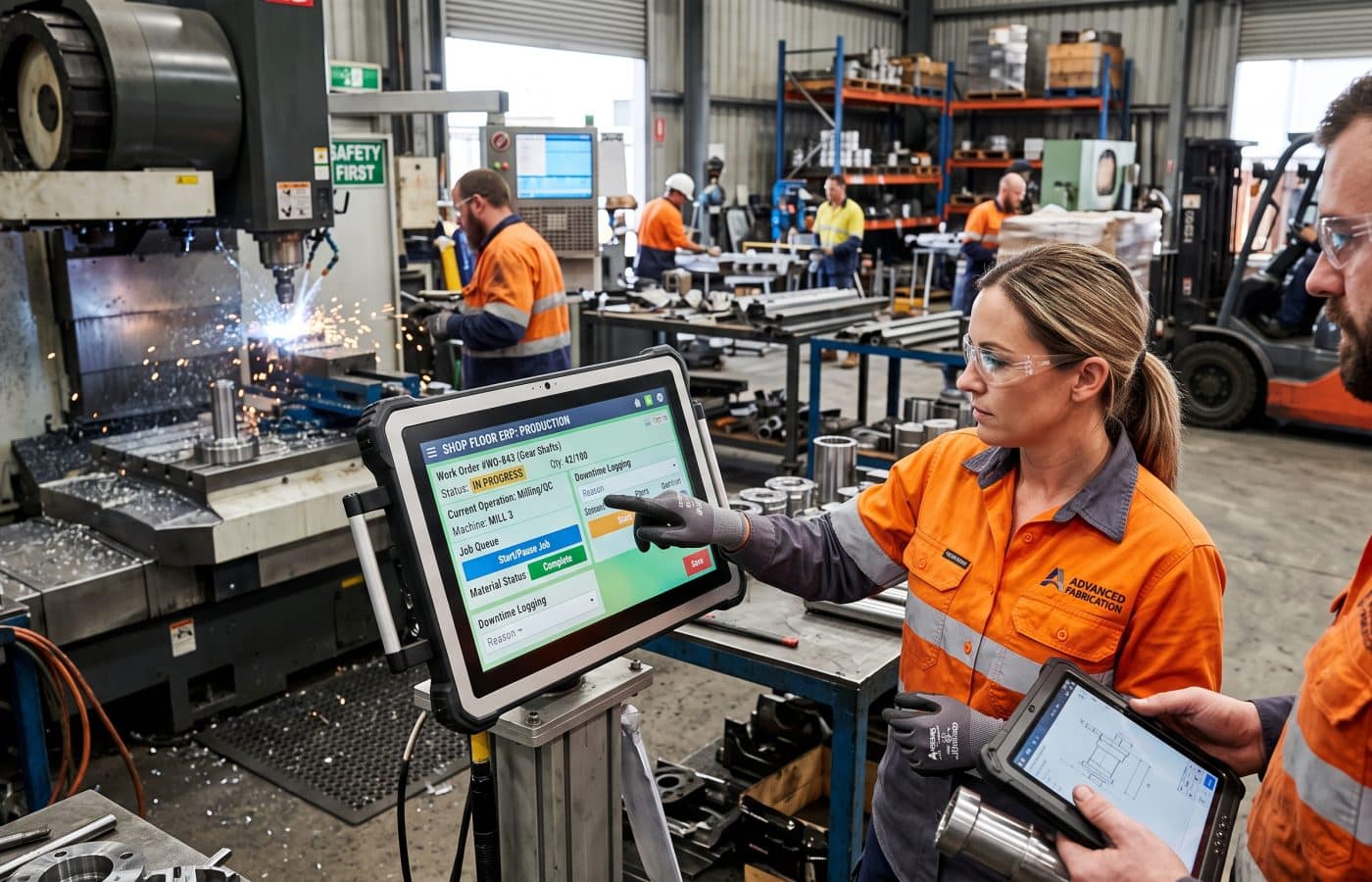
ERP for Manufacturing: Features That Actually Matter on the Floor

When a plant manager asks me to help choose an ERP for manufacturing, my first move is to put on safety glasses and walk the floor. Forget the demo and the feature matrix for a moment. What I want is to stand next to the second shift lead at the saw cell and watch what she writes on the clipboard hanging off the machine guard.
That clipboard tells me more about what the plant needs than any sales deck ever has. It shows me which numbers people actually trust, which ones they work around, and where the current system has already lost the floor’s confidence.
Why I Judge ERP for Manufacturing From the Floor First
I have spent a long career in plant operations and the last stretch of it as a consultant, mostly in discrete manufacturing: machine shops, fabricators, assembly operations, a few food and packaging plants. Over those years, some ERP projects went beautifully and others turned a well run plant into a building full of people keeping a second set of books in Excel. The difference almost never came down to the software brand. It came down to whether the people choosing the system understood what happens between the purchase order and the shipping dock.
So this is not a vendor comparison. It is the list I wish someone had handed me twenty years ago: the features in ERP for manufacturing that genuinely change life on the floor, the ones that look great in a conference room and then sit unused, and how to tell the difference before you sign.
Why So Many Manufacturing ERP Projects Lose the Floor
Let me start with an uncomfortable number. Panorama Consulting Group’s 2025 ERP Report found that 73% of discrete manufacturing ERP projects fail to meet their objectives, with cost overruns averaging 215%.
You should take any single failure statistic with some salt, because the definition of “failure” moves around a lot. Prosci, for example, defines failure as delivering less than 70% of expected business benefits, and under that definition it reports failure rates between 11% and 31%. So the honest answer is that it depends on what you were promised and how you measure it.
People and Process Decide Manufacturing ERP Outcomes
Here is the part every study I have read agrees on, and it matches what I see in plants. In a survey of 315 manufacturers commissioned by Ultra Consultants, Mint Jutras concluded that people and process are the primary reasons for ERP implementation success, not software.
That lines up perfectly with my experience. When a project goes sideways, the cause is rarely that the system could not calculate something. More often, the system asked operators to do things that did not fit the rhythm of the work, so they stopped doing them. Once transactions stop, the data rots. Planning then drifts back to the whiteboard, and now you own a very expensive accounting package.
Everything that follows is about avoiding that slide.
Where ERP Sits in a Manufacturing Plant
Before we talk features, it helps to be clear about what ERP is supposed to do and what it is not.
The industry has a standard for this, and it is worth knowing even if you never read it in full. ISA95, also published internationally as IEC 62264, draws clean lines between business systems and the plant floor. In that model, manufacturing operations management belongs to Level 3, while ERP primarily operates at Level 4. Level 3 is where the MES lives, and it responds to the real time progress of shifts, operations, and production orders, while Levels 1 and 2 handle machine control, which is also where OT cybersecurity does most of its work.
Why the Layers Matter to a Plant Manager
A lot of disappointment comes from expecting ERP to behave like an MES. ERP thinks in days and weeks, while your floor thinks in minutes. One of my favorite illustrations of this gap is that an ERP system may treat “Line 1” as a cost accounting location, while the MES may require a hierarchy of plant, area, line, workstations, and equipment. Same name, completely different meaning.
That doesn’t mean small and midsize plants need a separate MES. Most midmarket ERP applications provide straightforward, built in MES features that smaller organizations can use to manage production from a single solution, and for many of my clients that is plenty. The point is to know which layer you are buying, so you judge it against the right expectations.
With that framing, here are the features I actually test.
1. ERP Routings and Work Centers That Match Manufacturing Reality
If I could only check one thing in a manufacturing ERP, it would be how it handles routings.
A routing is the sequence of operations a part travels through: saw, mill, deburr, inspect, weld, paint. Each step sits at a work center with a setup time, a run time, and a crew. Every downstream calculation, from scheduling to costing to capacity, rests on this data being right.
What to Check in Routings
- Alternate routings. When the primary laser is down, does the job move to the older laser with a different run rate? Real plants do this every week, and the same goes for parts that can be either CNC machined or 3D printed. If the system can’t hold an alternate routing, your planners will override it manually and the costing will be wrong forever.
- Overlapping operations. Good shops don’t wait for the full batch of 500 to finish milling before deburr starts. They send the first tote over. The system should understand send ahead quantities, or your lead times will look twice as long as they really are.
- Outside processing as a real step. Plating, heat treat, and anodizing usually happen at a vendor. That step needs a purchase order, a ship date, a receiving point, and a place on the schedule. In weak systems it disappears into a black hole between operations.
- Easy maintenance by the people who know. Your manufacturing engineer should be able to update a run time in a few minutes. If every routing change needs IT, the routings will drift out of date within a year.
A Lesson From a Fabricator
One fabricator I worked with had routings that had not been touched in six years. The system said a bracket took 4 minutes on the press brake. It actually took 11 after they switched to a thicker gauge. Every quote, every schedule, and every margin report for that product family was fiction. The software was fine; the data simply had nobody owning it.
2. Manufacturing ERP Scheduling That Respects Capacity
This is the feature that causes the most heartbreak, because almost every sales demo shows a beautiful schedule, and almost nobody explains the logic behind it.
The Infinite Capacity Problem
Most traditional ERP planning runs on MRP logic, which uses infinite capacity. The University of Cambridge Institute for Manufacturing explains that infinite capacity scheduling plans to the customer’s due date first and only afterward tries to reconcile the result with available capacity. In other words, the system happily loads three weeks of work onto one machine for next Tuesday and leaves you to sort it out.
That is fine for material planning. For daily dispatch, though, it is a disaster. When a plant tells me “the ERP schedule is useless, so we use the whiteboard,” nine times out of ten this is why.
What Actually Helps on the Floor
- Finite capacity scheduling, either built in or bolted on. Finite capacity scheduling considers capacity from the very start, so the schedule is built on what is actually available. Ask the vendor directly whether their scheduler is finite. If they hesitate, it isn’t.
- A dispatch list a supervisor can read in ten seconds. The person running the cell at 6 a.m. needs to see what is next, whether the material is staged, and whether the tooling is ready. A Gantt chart on a planner’s monitor does not help her.
- Constraint awareness beyond machines. Your bottleneck might be a certified welder, a single fixture, or the one forklift that can reach the top rack. Good scheduling tools let you model those constraints.
- Fast rescheduling. Something breaks every day. The schedule should recover in minutes, not wait for the overnight MRP run.
My rule of thumb is simple. Use infinite planning to buy material and look at the big picture weeks out. Use finite scheduling to run the floor this week. If your ERP for manufacturing can’t do the second part, plan on adding a scheduling tool and budget for the integration from day one.
3. Shop Floor Data Collection in Your Manufacturing ERP
Every manufacturing ERP promises “real time visibility.” Here is the catch: the system only knows what someone tells it. Visibility depends entirely on data collection, and data collection depends entirely on whether operators find it tolerable.
When I evaluate this, I literally time it. How many taps does an operator need to clock onto a job, report a quantity, and log scrap? If it is more than about four, compliance falls off a cliff by the third week.
What Makes or Breaks Floor Data Collection
- Barcode or badge scanning instead of typing. Gloved hands and keyboards do not mix. Scan the traveler, scan the badge, done.
- Rugged terminals or tablets placed where the work happens. If the kiosk is 60 feet away by the break room, people batch their entries at the end of the shift, and your “real time” data is now eight hours old and mostly guessed.
- Simple scrap and downtime reason codes. Keep the list short. Twelve reasons is useful. Sixty reasons means everyone picks “Other.”
- Offline tolerance. Plant WiFi drops. The terminal should hold the transaction and sync later, not throw an error the operator ignores.
- Language and readability. Many floors are multilingual. Large fonts, icons, and language options are not luxuries.
Respect Beats New Modules
The best implementation I ever saw on this front was in a small machine shop where the owner sat with each operator for twenty minutes, asked what annoyed them about the old paper traveler, and configured the screens around those answers. Labor reporting accuracy went from roughly a guess to something the accountant actually trusted. No new module was involved, just respect for the people doing the work.
4. Material Consumption That Keeps Inventory Honest
Ask any plant controller what keeps them up at night and inventory accuracy is near the top. The way your ERP records material consumption matters enormously here, and the main tool most systems use is backflushing.
How Backflushing Works and Where It Fails
Backflushing automatically deducts the standard components for a product when its completion is reported, instead of recording each material issue by hand. It’s a great feature for repetitive work. You report 100 assemblies done and the system deducts 400 screws, 100 housings, and 100 gaskets.
The trouble is that backflushing is only as good as your bill of materials and your scrap reporting. Wrong standard quantities or unreported scrap can quietly throw inventory balances off. That word “quietly” is the important one. Nobody notices until the line stops for a part the system swears is on the shelf.
Controls I Recommend
- A hybrid approach. Backflush predictable items and report expensive or variable components manually. Backflush the fasteners. Issue the titanium bar stock by hand.
- Configurable backflush points. Backflushing at final completion is too late for long routings. Backflushing at the operation where the material is consumed keeps work in process accurate.
- Cycle counting built into the workflow. A regular cycle count program is the only reliable way to verify backflushing. If counts keep showing variances, the BOM is wrong or scrap is going unreported, and you fix it immediately.
- Variance reports a human will read. Material usage variance should land on someone’s desk weekly, by part, with the biggest offenders on top.
I treat BOM accuracy as a production issue, not an engineering clerical task. When I see a plant with 85% BOM accuracy, I know their inventory numbers are a coin flip no matter which ERP they run.
5. ERP Traceability That Survives a Manufacturing Audit
If you supply aerospace, medical, automotive, or food customers, traceability is not optional. That includes parts made through additive manufacturing, where powder lots and build files need the same genealogy as bar stock. And it is one of those features where “we support lot tracking” can mean wildly different things.
The Mock Recall Test
The test I run is a mock recall. I pick a raw material lot received three months ago and ask the system two questions. First, which finished goods contain material from this lot, and which customers received them? Second, starting from one shipped serial number, which raw material lots, which operators, and which machines touched it?
If the system can answer both in a few minutes, good. If someone has to pull paper travelers from a filing cabinet, the feature is technically present and practically useless.
Traceability Details That Matter
- Forward and backward genealogy across multiple levels of subassemblies, not just one.
- Lot capture at the point of use, ideally by scanning, so the record reflects what actually went into the job rather than what the plan said would.
- Supplier certificates attached to the lot record, so your quality team doesn’t hunt through email during an audit.
- Handling for split and merged lots, which happens constantly in real production and breaks weaker systems.
6. Quality Inside the Workflow, Not Beside It
Quality modules are often sold as separate add ons, and that separation is exactly the problem. When quality lives in its own island, inspections become something people do after the fact, if they remember.
What I want to see is quality embedded in the routing itself. A first article inspection that has to be signed off before the operation can be reported complete. An in process check that pops up every 50 pieces. A nonconformance that, once logged, automatically puts the affected lot on hold so it can’t be picked for shipping.
Quality Features Worth Testing
- Inspection steps tied to routing operations, with the ability to block progress until they pass.
- Automatic quarantine of suspect material when a nonconformance is raised.
- Corrective action tracking that links back to the specific job, lot, and work center.
- Simple trend data on defects by part, machine, and shift, so the morning meeting can talk about facts instead of feelings.
One plant cut its customer returns noticeably just by making the in process check a hard stop instead of a suggestion. The software had supported it all along. Nobody had turned it on.
7. Maintenance and Downtime Visibility
Machines break. What separates good plants from struggling ones is whether they know why, how often, and what it costs.
Many ERP systems include a basic maintenance module, and for smaller plants it can be enough. Larger operations usually need a dedicated CMMS. Either way, the features that matter on the floor are:
- preventive maintenance schedules driven by run hours or cycle counts rather than just the calendar
- work orders that a technician can open and close from a phone
- spare parts linked to inventory so the critical bearing is actually on the shelf
- downtime reasons captured from the same floor terminals operators already use
That last one matters most. When downtime is captured in the same screen as production reporting, you can finally see that the lathe in cell 3 lost 14 hours last month to waiting on material, not mechanical failure. That changes the conversation from “buy a new lathe” to “fix the material staging process,” which is a far cheaper fix.
8. Engineering Change Control in ERP for Manufacturing
This one rarely shows up in demos, and it quietly causes enormous waste.
When engineering revises a drawing, often after a round of rapid prototyping, the floor needs to know immediately, the old revision needs to stop being built, and inventory of the old version needs a decision: use it up, rework it, or scrap it. Without revision levels and effective dates in your ERP for manufacturing, you will eventually build a full batch to the wrong drawing. I have seen it happen more than once, and it always lands on a Friday afternoon. The risk grows if you run production 3D printing, where a revised digital file can change a part overnight.
Look for revision control on both BOMs and routings, effective dating so changes take hold on a specific date or serial number, a clear way to show operators the current revision at the workstation, and a record of who approved each change.
ERP for Manufacturing Features That Rarely Move the Needle
To be fair, none of these are bad features. They just tend to get far more attention during selection than they deserve, while the basics above get skimmed.
Dashboards, AI, and Customization
Executive dashboards. They look great in the demo. But a dashboard built on bad routing data and skipped transactions is just a prettier way to be wrong. Fix the data first and the dashboards almost build themselves.
AI forecasting and predictive anything. Some of it is genuinely useful in mature operations. In a plant where half the labor hours are estimated at the end of the shift, it predicts noise.
Heavy customization. Every custom screen becomes a tax on every future upgrade. I push clients hard to change the process before changing the code, unless the process is a true competitive advantage.
Too many modules on day one. Plants that try to go live with finance, production, quality, maintenance, CRM, and a customer portal all at once tend to do all of them poorly. Phase it.
A Cautionary Manufacturing ERP Go Live
There is a well known cautionary tale here. According to a summary by an implementation firm, Revlon’s 2018 SAP S/4HANA rollout went live without well designed and maintained controls, and the resulting problems kept its North Carolina plant from fulfilling $64 million in orders. That was not a missing feature. That was a go live that outran the floor’s readiness.
How I Run a Floor First Manufacturing ERP Evaluation
Here is the process I actually use with clients. It’s not glamorous, but it works.
Before You Talk to Vendors
- Walk the floor before writing requirements. Spend a full shift watching how work moves. Note every clipboard, spreadsheet, and whiteboard. Each one represents a gap the new system must close or at least not make worse.
- Write scenarios, not checklists. Instead of “supports lot tracking: yes or no,” write “A customer calls about a defective unit with serial 4471. Show me every raw material lot inside it in under five minutes.” Make vendors demo your scenarios with your data.
- Bring operators to the demo. Put a real cell lead in front of the floor screens. Watch her face. If she frowns, believe the frown over the salesperson.
Before and After Go Live
- Audit your master data early. Routings, BOMs, work centers, and item masters will need cleanup no matter which system you choose. Start now. It is the longest pole in the tent.
- Pick an implementation partner who knows manufacturing. A partner who has set up a hundred finance systems but never a routing will learn on your dime.
- Plan go live around production reality. Avoid your peak season. Run parallel where you can. Have super users on every shift for the first few weeks.
- Measure what changed. Pick three or four floor metrics before go live, such as schedule adherence, inventory accuracy, and on time delivery, and track them for six months afterward. That is how you know whether the system earned its keep.
The Bottom Line on ERP for Manufacturing
The right ERP for manufacturing is not the one with the longest feature list. It’s the one your operators will actually feed with accurate data every shift, because it fits the way the work moves.
If I had to boil a whole career down to one sentence for a plant manager shopping for a system, it would be this: judge every feature by what it asks the person on the floor to do, and what it gives back to them in return. When the trade is fair, people use it. When it isn’t, they go back to the clipboard, and no amount of software will bring them back.
Start at the saw cell. Watch the clipboard. Then go look at software.
Frequently Asked Questions About ERP for Manufacturing
What is ERP for manufacturing?
ERP for manufacturing is enterprise resource planning software built to handle production specific needs such as bills of materials, routings, work orders, capacity planning, shop floor reporting, and traceability, alongside finance, purchasing, and sales. It connects what the business plans with what the plant builds. For background on how ERP grew out of earlier planning methods, see Manufacturing resource planning on Wikipedia.
Do I need an MES if I already have a manufacturing ERP?
Not always. Many smaller and midsize plants run well on the shop floor features built into their ERP. A separate MES makes sense when you need machine level data capture, detailed electronic work instructions, or heavy regulatory traceability. Acumatica’s overview of MES and ERP and SAP’s explanation of MES both lay out where each system fits.
Why does my ERP schedule never match what happens on the floor?
Most ERP planning engines use infinite capacity logic, which plans to due dates without checking whether machines and people are actually free. Adding finite capacity scheduling usually fixes this. The University of Cambridge IfM page on finite capacity scheduling explains the difference clearly.
Is backflushing a good idea for my plant?
Backflushing works well for repetitive production with accurate BOMs and disciplined scrap reporting. For expensive or variable materials, manual issuing is safer, and many plants use a mix of both. ERP Research’s backflushing glossary entry and Expandable’s Backflushing 101 guide cover the risks and controls.
What is ISA95 and why does it matter when choosing ERP?
ISA95 (IEC 62264) is the international standard that defines how business systems and plant floor systems exchange information. It helps you separate ERP responsibilities from MES and control system responsibilities so you set the right expectations. See the ISA95 standard page from the International Society of Automation.
Why do so many manufacturing ERP implementations fail?
The most common causes are poor change management, bad data migration, and implementation teams without manufacturing experience, rather than the software itself. Survey work summarized by Rootstock and failure research compiled by Godlan both point to people and process as the deciding factors.
References
- International Society of Automation. ISA95, Enterprise-Control System Integration. https://www.isa.org/standards-and-publications/isa-standards/isa-standards-committees/isa95
- Explitia. ISA-95 Explained: MES, ERP and Manufacturing Data. https://explitia.com/blog/isa-95-explained-mes-erp-manufacturing-data/
- University of Cambridge, Institute for Manufacturing. Finite Capacity Scheduling. https://www.ifm.eng.cam.ac.uk/research/dstools/finite-capacity-scheduling/
- ERP Research. What is Backflushing? ERP Glossary. https://www.erpresearch.com/glossary/backflushing
- Expandable Software. Backflushing 101: The Basics and Keys to Success. https://expandable.com/backflushing-101-the-basics-and-keys-to-success/
- ISE Team. Backflushing and Consumption Accuracy in Business Central. https://www.iseteam.com/resources/backflushing-and-consumption-accuracy-in-business-central/
- Acumatica. MES and ERP: Key Differences and How They Work Together. https://www.acumatica.com/blog/erp-for-manufacturers/
- SAP. What is a Manufacturing Execution System (MES)? https://www.sap.com/resources/what-is-mes
- Rootstock. ERP Implementation Success Factors from Survey Data. https://www.rootstock.com/cloud-erp-blog/erp-implementations-are-more-successful-than-you-thought/
- Godlan. ERP Implementation Failure Statistics: 2026 Research. https://godlan.com/erp-implementation-failure-statistics/
- Concord ERP. Why ERP Implementations Fail: Statistics and Case Studies. https://concorderp.com/blogs/why-70-of-erp-implementations-fail-and-how-to-not-be-that-statistic/
- XoroSoft. ERP Implementation Failure Statistics: 2026 Data and Risks. https://xorosoft.com/erp-implementation-failure-statistics/
- Initos. ERP Implementation: The Ultimate 7 Factors to Avoid. https://www.initos.com/en/blog/what-to-avoid-in-erp-implementation-project/